
Best Image Search Apps in 2026
Quick answer: Lens AI is the best image search app for identifying an unfamiliar object and getting a plain-language explanation. Google Lens is better if you want free visual matches, shopping links and broad web coverage. TinEye is the specialist pick for finding exact or edited copies of an existing photo.
You have a screenshot of a chair, no brand name and no useful words to type. Or perhaps a suspicious profile photo has landed in your messages. An image search app turns the picture itself into the query.
The catch is that these tools search different indexes and answer different questions. We ranked eight options by what they find, what they cost and how much setup stands between your photo and a useful result.
Comparison at a glance
| App | Best for | Platforms | Free version | Price | Standout |
|---|---|---|---|---|---|
| Lens AI | Plain answers about objects | iPhone, Android and web | Free download; no-cost mobile limit is not stated | $39.99 yearly or $89.99 lifetime | Explains what an object is |
| Google Lens | Free general visual search | iPhone, iPad, Android and web | Free; official search quota is not stated | Free | Broad web and shopping matches |
| Microsoft Bing Visual Search | A second search index | iPhone, iPad, Android and web | Free; official search quota is not stated | Free | Visual results with Bing and Copilot |
| TinEye | Exact and edited copies | Web and browser extensions | Free searches; current limit is unclear | Consumer paid price unknown | Sorts matches by oldest or newest |
| Apple Visual Intelligence | Built-in iPhone camera help | Supported iPhones | Included on compatible hardware | No separate app fee | Works from built-in iPhone controls |
| Yandex Images | Visually similar images | Web | Free; official search quota is not stated | Free | Different index from US search engines |
| Reversee | Multi-engine iPhone searches | iPhone and iPad | Google image searches with ads and delays | $3.99 Pro; $1.99 multi-engine purchase | Sends one image to several engines |
| Photo Sherlock | Simple reverse image lookup | iPhone, iPad and Android | Free version with ads | $1.99 Pro on iPhone | Crop and rotate before searching |
Prices and ratings from the US App Store and Google Play, checked October 2026. Store prices change; the listing is the final word.
How we picked
We read the US App Store and Google Play listings, official sites, pricing information and help pages available for these eight tools. Ratings, compatibility, prices and update dates were checked in October 2026.
The order favors useful answers across several everyday image searches. Exact-copy specialists still rank well, but web-only access, old updates, unclear free limits and narrow platform coverage cost points. Store rating totals show audience size; they do not measure how well one image-search function fits this job.
- The tool must accept a photo, screenshot or camera image.
- Results should fit the intended task: objects, products, similar pictures or exact copies.
- Source pages and useful context count more than a confident label alone.
- Free limits and yearly cost must be stated or marked unknown.
- Platform support, update date and setup friction affect the ranking.

Lens AI
4.6 on the App Store (1,593 ratings) · 4.3 on Google Play (1,888 reviews)
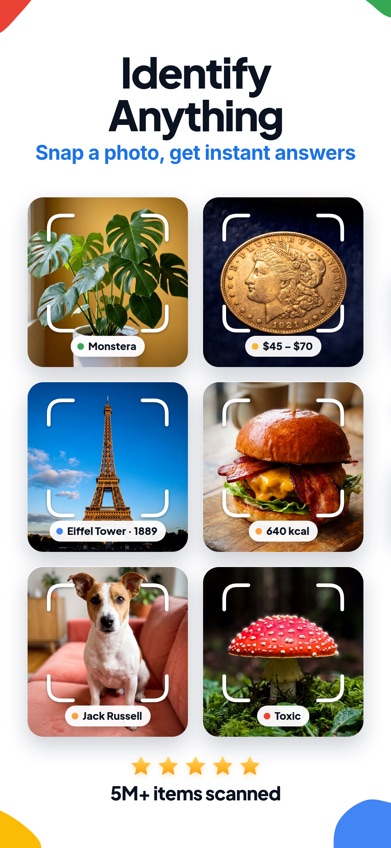
Lens AI is a dedicated image search app that identifies objects and explains them in plain language. This is its main difference from the Google Lens app: Lens AI is built around answering what the photographed object is, while Google Lens mainly returns web visual matches, related pages and shopping links.
You can take a photo or upload a screenshot to identify plants, animals, products, coins and everyday objects. It also has reverse image search, text translation, product comparisons and follow-up questions. That range earns first place despite the smaller audience. The iPhone listing had 4.55 stars from 1,593 ratings and was updated October 5, 2026; Google Play showed 4.3 stars from 1,888 reviews and 50,000-plus installs.
Cost needs a careful look. The free download does not state a firm mobile scan allowance in the supplied listing. Paid choices include $39.99 per year and $89.99 lifetime. The $7.99 weekly option becomes $415.48 over 52 weeks, so annual billing is far saner if you subscribe. Lens AI requires iOS 17 or later on Apple devices. Upload retention details were not supplied, so private documents deserve a policy check before scanning.
- Plain-language object identification
- Camera, screenshot and saved-photo input
- Reverse search plus product and value clues
- Free mobile scan limit is unclear
- Weekly billing is expensive over a year
- iPhone version requires iOS 17 or later
- Price
- Checked October 2026: free download; $9.99 monthly, $39.99 yearly, $89.99 lifetime or $7.99 weekly.
- Platforms
- iPhone, iPad, Android and web; the website states one free web scan per day.
Pick Lens AI if you want an answer about what is in a picture, followed by context and optional reverse-search results.
Google Lens
4.7 on the App Store (5,256,367 ratings)
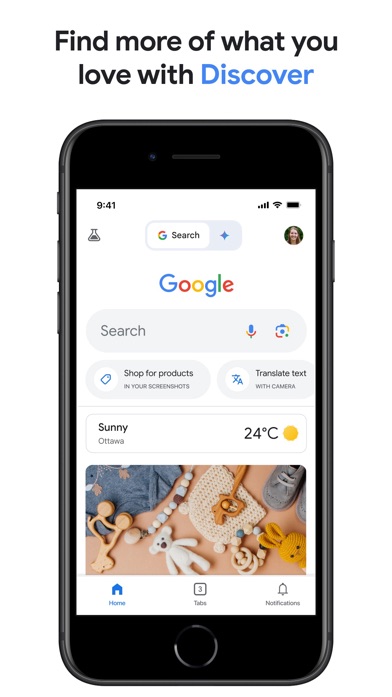
On iPhone, Google Lens sits inside the Google app; Android has a standalone Lens app and other entry points. It is the strongest free choice for matching products, plants, landmarks, text and visually related webpages.
The useful trick is adding words after the photo search. A picture of shoes can become a search for the same style in blue, while a broken bicycle part can be paired with a repair query. Shopping links and broad web coverage are Google Lens's main wins over Lens AI. Consumer Lens use has no confirmed paid plan, though an official usage quota is also unavailable.
The US Google app listing had 4.65 stars from 5,256,367 ratings and was updated October 19, 2026. That enormous count applies to the full Google app, not Lens by itself. On iPhone, you must install a much broader search app and use an account-linked service if activity is saved. Check image and activity settings before uploading receipts, faces or location-sensitive photos.
- Free consumer visual search
- Strong shopping and related-webpage results
- Text can refine a photo query
- Lens is inside the Google app on iPhone
- Rating covers the full app
- Official search quota is unknown
- Price
- Checked October 2026: free for consumer Lens use; unrelated storage and AI purchases appear in the Google app.
- Platforms
- Android, iPhone and iPad through Google apps, plus web access; iPhone requires iOS 16 or later.
Pick Google Lens if you want free web matches and shopping results, and you do not need a dedicated plain-answer app.

Microsoft Bing Visual Search
4.8 on the App Store (298,365 ratings)
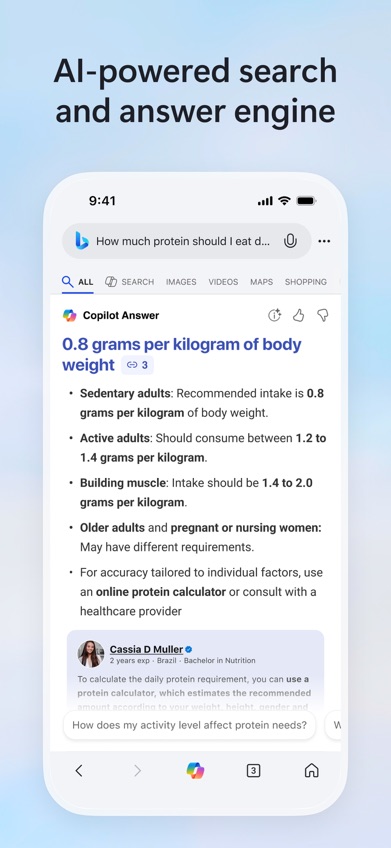
Microsoft Bing Visual Search accepts camera images and uploaded pictures through the Bing app or website. It searches for related images, products and text, then places those results alongside Bing and Copilot search tools.
Its real value is index diversity. When Google Lens finds nothing useful, searching the same crop in Bing may expose a different product listing or webpage. Bing is free for consumer use, and no official quota was confirmed. The iPhone app had 4.75 stars from 298,365 ratings and was updated October 16, 2026. As with Google, that rating covers the whole search app.
Setup is less friendly on older Apple hardware because the current listing requires iOS 18 or later. The app also includes news, weather, rewards and image creation, so it feels oversized if reverse image search is your only goal. Uploaded pictures go to an online search service; review account and privacy settings before sending personal material.
- Different search index from Google
- Camera and photo-library input
- Free visual and product searches
- iPhone app requires iOS 18 or later
- Visual search sits inside a larger search app
- Official free quota is unknown
- Price
- Checked October 2026: free; no consumer Visual Search payment was confirmed.
- Platforms
- iPhone, iPad, Android and web.
Pick Microsoft Bing Visual Search if your first image search missed and you want another free index.
TinEye
TinEye is a web reverse image search tool for locating exact, cropped or edited versions of an image. It is less interested in naming the chair in your photo. Its job is finding where that particular chair photo has appeared online.
Results can be sorted by oldest, newest, largest or most changed. Those controls help when you are tracing an earlier upload, looking for a higher-resolution copy or checking how an image was modified. This makes TinEye a better pick than Lens AI or Google Lens for provenance work. A found page is still a lead; ownership and upload dates need confirmation from source records.
TinEye has no regular iPhone or Android app in the supplied information, so you use its website or browser extension. Sources disagree about whether the free allowance resets daily or weekly; the official current limit remains unknown. Current consumer paid pricing was also unavailable. That uncertainty and web-only setup keep it below the general-purpose apps, but exact-copy search is a specific job it handles well.
- Finds exact and altered copies
- Oldest, newest and image-size sorting
- Useful for source research
- Web only
- Poor fit for identifying unknown objects
- Current free limit is unclear
- Price
- Checked October 2026: free searches are available; check the site for current limits and paid pricing.
- Platforms
- Web and browser extensions.
Pick TinEye if you already have an image and want to find copies, edits or earlier appearances online.
Apple Visual Intelligence
Apple Visual Intelligence is built into supported iPhones. It uses the camera and system controls to identify objects or scenes and provide contextual information without requiring a separate picture search app.
Setup friction is the selling point. If your iPhone already supports it, you can start from familiar camera controls and avoid adding another app to an overstuffed home screen. It suits occasional questions about something in front of you. There is no separate app price, store rating or downloadable Android version.
Hardware compatibility is the catch. Visual Intelligence is limited to supported iPhone models, and its exact functions can vary with the device, software version and region. It also lacks the defined exact-copy workflow of TinEye and the dedicated multi-engine controls in Reversee. Check Apple's current device list before assuming that an iOS update alone will add it to an older phone. Android users can move along; there is nothing to install.
- Built into supported iPhones
- No separate app charge
- Low setup friction
- Supported iPhones only
- Functions vary by hardware and software
- No App Store rating for the tool itself
- Price
- Checked October 2026: included with compatible iPhone hardware; no separate app fee.
- Platforms
- Supported iPhone models only.
Pick Apple Visual Intelligence if you own a compatible iPhone and want occasional camera-based answers without another download.
Yandex Images
Yandex Images is a web picture search tool that accepts an image and returns visually similar pictures and related pages. Its separate index can uncover results that Google, Bing or TinEye missed.
Secondary source comparisons report particular strength with faces, places and non-Western web content. Treat those results cautiously: visual resemblance does not confirm a person's identity, a location or the original source. Yandex Images is free for consumer searches, though an official usage quota was not available. Running a second or third search is often sensible because no provider indexes the whole web.
For US readers looking for an app to download, the web-first format is the drawback. Official mobile app details and current store ratings were not supplied, and the interface may feel less familiar than Google Lens or Bing. Uploading a face or personal photo also creates a privacy decision, so read the current image-handling terms first. Yandex ranks here for search coverage, not convenience.
- Different international image index
- Good backup for visual similarity
- Free consumer web search
- Primarily a web tool
- Official quota is unknown
- A visual match cannot confirm identity
- Price
- Checked October 2026: free consumer search; check the site for current limits.
- Platforms
- Web; check current listings for official mobile availability.
Pick Yandex Images if other engines missed a visually similar image, place or international webpage.

Reversee
4.4 on the App Store (12,864 ratings)
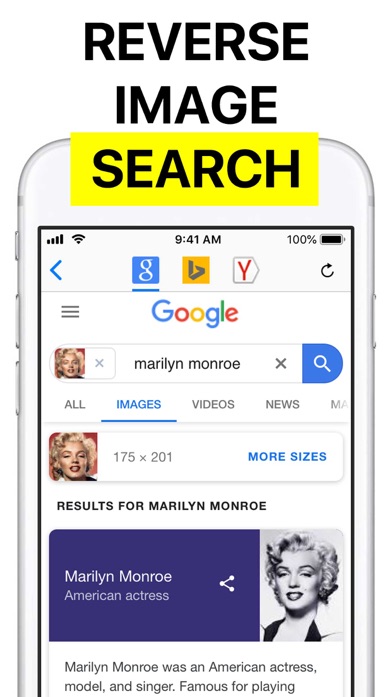
Reversee is an iPhone and iPad utility that sends a selected picture to reverse-search engines. The free setup uses Google Images; paid options add Bing and Yandex.
Its editor can crop or rotate an image before searching, which helps remove borders, captions and unrelated objects from screenshots. The iOS extension also starts a search from Photos, Safari and other apps. Pro removes ads and a five-second extension delay, while adding image details and more input options. This is a focused workflow tool, not its own search index.
The concern is age. Reversee's US listing had 4.43 stars from 12,864 ratings, but the last listed update was October 3, 2023. It still supports iOS 10 and later, which is useful for old devices, though three years without a listed update is hard to ignore. Searches go to third-party engines, so their coverage and image policies determine the result.
- Google, Bing and Yandex searching
- Useful crop and rotation tools
- Works from the iOS share extension
- Last listed update was in 2023
- Paid engines use separate purchases
- No Android version confirmed
- Price
- Checked October 2026: free; $3.99 Pro and $1.99 Multiple Search Engines purchases are listed.
- Platforms
- iPhone and iPad with iOS 10 or later.
Pick Reversee if you want to send one iPhone image through several search engines with minimal repetition.

Photo Sherlock
4.7 on the App Store (3,749 ratings)

Photo Sherlock is a basic search-by-image app for camera shots and saved photos. You can crop or rotate the picture, submit it to search engines and inspect results in a built-in browser.
The simple design fits occasional searches for a reused profile photo, an original image or a higher-resolution copy. The iPhone Pro purchase is only $1.99 and removes ads while adding external-browser links. The US App Store listing had 4.67 stars from 3,749 ratings and was updated June 10, 2026. That recent update helps it, though Reversee has the stronger multi-engine workflow.
Photo Sherlock cannot verify that a dating profile is genuine or that two similar faces belong to the same person. Search results are leads that need checking against source pages. Android availability is reported, but current Android pricing and limits were not verified in the supplied store data. If the app requests credits or a subscription on your device, check the listing before paying.
- Camera and gallery searches
- Crop and rotation controls
- Low-cost iPhone Pro purchase
- Cannot confirm identity or authenticity
- Android price and limits are unknown
- Less control than Reversee
- Price
- Checked October 2026: free on iPhone; Pro is listed at $1.99. Check the Android listing for current terms.
- Platforms
- iPhone, iPad and Android.
Pick Photo Sherlock if you want a cheap, simple reverse image search with basic editing controls.
Lens AI vs Google Lens
These are the two broadest choices. Lens AI ranks first for direct identification and explanation; Google Lens wins on free web coverage and shopping.
| Point | Lens AI | Rival |
|---|---|---|
| Primary result | Names the object and gives a plain-language answer | Returns visual matches, webpages and shopping links |
| Inputs | Camera, saved photo and screenshot | Camera and saved image, with text refinement |
| Cost | Free download with paid plans up to $39.99 yearly | Free consumer Lens use |
| iPhone requirement | iOS 17 or later | iOS 16 or later through the Google app |
| Best use | Understanding an unfamiliar object | Finding where to buy or read about it |
Lens AI is the better first stop when your question is simply, What is this? It puts an explanation ahead of a page of links.
Google Lens wins when price is the deciding factor or you mainly want product listings and broad web matches. Its App Store audience is vastly larger, though the rating applies to the entire Google app.
What to check before installing an image search app
Match type
Decide what answer you need. Object recognition names an item; visual similarity finds lookalikes; exact-match search traces copies of the same file. A tool can be excellent at one and disappointing at another. Use TinEye-style exact search for copied photos, and a general visual search tool for products, plants or objects.
Source coverage
Every service has a different image index. A blank result only means that service found nothing. It does not mean the picture has never appeared online. For source research, run the image through two engines and inspect the actual pages, dates and image sizes instead of accepting the first thumbnail.
Privacy settings
An uploaded photo may contain faces, addresses, account numbers or location clues. Read the current retention and activity settings before searching private material. Cropping can remove unrelated details, but it does not change the fact that the remaining image is sent to an online service for analysis.
Real yearly cost
Weekly plans are easy to underestimate. Lens AI's listed $7.99 weekly option reaches $415.48 over a year, compared with $39.99 for its annual plan. Check the paywall, renewal period and free scan allowance before confirming payment. A five-second task does not need a car-payment-sized subscription.
Frequently asked questions
Which image search app is most accurate?
No single image search app is most accurate for every picture. Accuracy changes with the task, image quality and each service's index, so verify important results with another source.
What is the best free reverse image search app?
Google Lens is the best free general option for visual matches, products and related webpages. TinEye is better when you specifically need exact or edited copies.
Which app finds exact duplicate images?
TinEye is the strongest specialist here for exact, cropped and altered copies. TinEye can also sort matches by age, size and degree of change.
Can I search by image using a screenshot?
Yes, many image search tools accept screenshots from your photo library. Crop away borders, usernames and unrelated objects when they interfere with the subject.
How is Lens AI different from Google Lens?
Lens AI puts a plain-language identification and context at the center of its result. Google Lens focuses more heavily on web matches, related images and shopping links.
Can reverse image search find someone from a photo?
Reverse image search may find public pages containing the same or a similar face. A visual match alone cannot confirm identity, authenticity or account ownership.
Are uploaded photos stored or reused?
Storage and reuse policies differ by service, account setting and search entry point. Check the current privacy, activity and retention controls before uploading sensitive photos.
Our recommendation
Start with Lens AI if you want to identify an unfamiliar object and receive a direct explanation. Choose Google Lens when free shopping and web matches are the priority, or TinEye when you need exact copies and source clues. Check Lens AI's paywall before subscribing; its annual option costs far less than paying weekly.
Lens AI is best for explaining what you photographed
Lens AI's strongest feature is simple and checkable: it identifies the subject and gives a plain-language answer, while Google Lens mainly leads with visual web matches and shopping pages. That makes Lens AI worth trying when you have a coin, plant, product or unfamiliar object and do not yet know what words to search. It suits people who want identification and context in one result. Free limits are unclear, so inspect the paywall before committing.