
Best AI Detector Apps in 2026
Quick answer: QuillBot is the best AI detector app for most people because it combines sentence-level checks with a free 1,200-word allowance and a native iPhone app. GPTZero is better for teachers who need document and classroom integrations. Scribbr is the easiest free option for students who want 1,200-word checks without creating an account.
A paper is due at midnight, an editor has 20 articles waiting, or a teacher is staring at 30 suspiciously polished essays. An AI detector can help decide what deserves a closer read. It cannot settle the case.
The best AI checker gives you passage-level detail, a usable free allowance and a price that makes sense after the first month. We ranked eight options on those points, with extra weight for native apps because US readers searching for an app usually want something they can download.
Comparison at a glance
| App | Best for | Platforms | Free version | Price | Standout |
|---|---|---|---|---|---|
| QuillBot AI Detector | Most individual users | Web, iPhone and iPad | Up to 1,200 words per scan | $19.99 monthly or $99.99 yearly, October 2026 | Sentence-level and document-wide results |
| GPTZero | Teachers and schools | Web, Chrome, Google Docs and Word | 10,000 words per month | Annual equivalent reported at $12.99 to $14.99 monthly, October 2026 | Deep Scan and classroom integrations |
| Scribbr AI Detector | Free checks without an account | Web | Unlimited checks up to 1,200 words each | Free; plagiarism bundles start at $19.95 per document | No-sign-up checking |
| Copyleaks | Multilingual teams | Web and API | Reported limits vary; check the listing | $16.99 monthly or $13.99 monthly equivalent yearly, October 2026 | AI and plagiarism checks in 30+ languages |
| Originality.ai | Publishers and content teams | Web, Chrome and API | Current allowance is unconfirmed | $14.95 monthly or $12.95 monthly equivalent yearly, October 2026 | Batch URL scans and team dashboards |
| ACI: AI Writer & AI Chat | All-in-one iPhone writing tools | iPhone and iPad | Free download; exact detector limit is unconfirmed | $3.99 weekly or $29.99 yearly, October 2026 | Detector, humanizer and rewriter in one app |
| ZeroGPT | Quick large web checks | Web | Reported limit of 15,000 characters per check | $9.99 monthly, October 2026 | Large free character allowance |
| Grammarly AI Detector | Current Grammarly users | Web, desktop, iPhone and iPad | Detector allowance is unconfirmed | From $83.99 yearly for mobile-only service, October 2026 | Detection inside a full document editor |
Prices and ratings from the US App Store and Google Play, checked October 2026. Store prices change; the listing is the final word.
How we picked
We read the supplied US App Store listings, developer sites, pricing pages and help material in October 2026. We also checked Google Play for matching listings. When a current native listing or exact limit could not be verified, we marked it unknown instead of filling the hole with a guess.
The order reflects detector detail, free limits, annual cost, platform access and setup friction. App Store rating counts show audience size, not detector quality, so Grammarly's 226,957 ratings did not automatically put it first.
- Results should include more than one percentage.
- The free tier should handle a useful document.
- Annual cost counts more than a cheap first week.
- Native apps receive credit when listings are verified.
- Privacy terms must be checked before sensitive uploads.

QuillBot AI Detector
4.7 on the App Store (3,061 ratings)
QuillBot AI Detector is the best fit for most people who want detection and editing in one downloadable app. It checks both full documents and individual sentences, which is more useful than receiving a mysterious percentage and being left to play detective.
The free detector handles up to 1,200 words per scan, with an 80-word minimum reported. That covers a short essay, article draft or several emails. QuillBot also has paraphrasing, grammar, translation and a humanizer, though those extras should not distract from the detector's main job.
The US App Store listing had 4.69 stars from 3,061 ratings and was updated October 16, 2026. The app runs on iPhone and iPad with iOS 16 or later. Its $99.99 annual plan works out far better than paying $19.99 every month, which would cost $239.88 across a year.
QuillBot still produces an estimate, not evidence of authorship. The 1,200-word cap also means long reports need to be split into pieces.
- Sentence-level and full-document analysis
- Useful 1,200-word free scan
- Long documents require several scans
- Verified Android availability is unknown
- Price
- Free tier; $19.99 monthly or $99.99 yearly, checked October 2026.
- Platforms
- Web, iPhone and iPad.
Pick QuillBot if you want the best balance of free detection, passage-level detail and native iPhone access.
GPTZero
GPTZero is a dedicated AI detector aimed at education and document review. Its main advantage is workflow depth: it marks suspected passages, has a Deep Scan mode and connects with Chrome, Google Docs, Microsoft Word and some learning systems.
The reported free allowance is 10,000 words per month. Scans above 10,000 characters may require a free account, but the monthly pool is still more generous than QuillBot's per-scan cap for teachers processing several assignments. Plagiarism checks and institutional API options are also available.
Pricing is less easy to compare. Available sources reported annual equivalents between $12.99 and $14.99 per month; current monthly pricing was not confirmed, so check the listing before paying. A year at those reported rates lands around $156 to $180.
GPTZero ranks second because its native iPhone, iPad and Android availability could not be verified. It is the stronger pick for classroom integrations, while QuillBot is easier for someone who wants an App Store download and writing tools in the same place.
- 10,000 free words per month
- Google Docs, Word and classroom connections
- Current native mobile listings are unverified
- Exact monthly price is unknown
- Price
- Free tier; annual equivalent reported at $12.99 to $14.99 monthly, checked October 2026.
- Platforms
- Web, Chrome, Google Docs and Microsoft Word; mobile app status is unverified.
Pick GPTZero if you review student writing and need integrations more than a native phone app.
Scribbr AI Detector
Scribbr AI Detector is a web checker for short academic documents. You can run unlimited free checks of up to 1,200 words each without creating an account, which removes two common annoyances at once: a tiny daily quota and another password.
That setup suits students checking their own drafts before submission. A 2,000-word essay requires two scans, but there is no reported monthly pool to ration. Scribbr also connects detection with its broader plagiarism service, though plagiarism and AI authorship are separate questions.
Premium AI checking is tied to plagiarism-checking purchases that start at $19.95 per document. That can make sense for a one-time thesis or important paper; frequent users will probably spend less with an annual subscription elsewhere.
There is no verified native iPhone, iPad or Android app in the supplied records. Scribbr ranks behind GPTZero because it has fewer classroom and document integrations, but it wins for immediate access. Open the site, paste the text and check it. No account ceremony required.
- Unlimited free 1,200-word checks
- No account required
- Web-only in the available records
- Paid checking starts per document
- Price
- Free detector; paid plagiarism bundles start at $19.95 per document, checked October 2026.
- Platforms
- Web; native mobile apps are unverified.
Pick Scribbr if you need occasional free essay checks and do not want an account or subscription.
Copyleaks
Copyleaks combines AI detection with plagiarism checking, sentence-level detail and support for more than 30 languages. That mix is better suited to publishers, schools and international teams than a single-purpose checker built mainly for English essays.
The service has an API and batch or team workflows, so repeated checks can fit into an existing publishing system. This is the reason Copyleaks ranks above cheaper web tools. If several editors need access, copying every article into a public form gets old fast.
Reported free limits conflict. Some sources cite 25,000 characters per scan without signing in; others describe an allowance near 10 pages per month. Check the current pricing page before planning a workflow around either number.
The reported personal plan costs $16.99 monthly, or $13.99 per month on annual billing. That is about $167.88 for a year on the annual rate. Native iPhone and Android listings were not verified, and privacy terms deserve a full read before a team uploads client drafts or unpublished work.
- Detection in more than 30 languages
- API and team workflows
- Conflicting free-limit reports
- Native mobile availability is unverified
- Price
- $16.99 monthly or $13.99 monthly equivalent yearly, checked October 2026.
- Platforms
- Web and API; native mobile apps are unverified.
Pick Copyleaks if your team checks multilingual material or needs AI and plagiarism results in one workflow.
Originality.ai
Originality.ai is built around publishing workflows: AI detection, plagiarism checks, team dashboards, an API and batch URL scanning. The URL tool is the deciding point for editors auditing a site or content library. Most consumer AI detector apps expect pasted text instead.
Credit-based use may also suit an agency that needs to assign costs by project. Team controls are more relevant here than a keyboard extension or rewriting mode. Originality.ai is focused on screening finished content, not helping someone compose a text message on an iPhone.
The reported monthly plan is $14.95, while annual billing works out to $12.95 per month, or about $155.40 for a year. Sources conflict on whether new users receive free credits, so assume no lasting free tier until the current pricing page says otherwise.
There is no verified native iPhone, iPad or Android listing in the supplied records. That keeps Originality.ai below Copyleaks for broad use, but publishers may prefer its batch URL and team tools. As with every detector here, a flagged result needs human review.
- Batch URL scanning
- Team dashboards and API access
- Free allowance is unconfirmed
- No verified native mobile app
- Price
- $14.95 monthly or $12.95 monthly equivalent yearly, checked October 2026.
- Platforms
- Web, Chrome and API.
Pick Originality.ai if you audit websites or manage AI checks across a publishing team.

ACI: AI Writer & AI Chat
4.8 on the App Store (23 ratings)
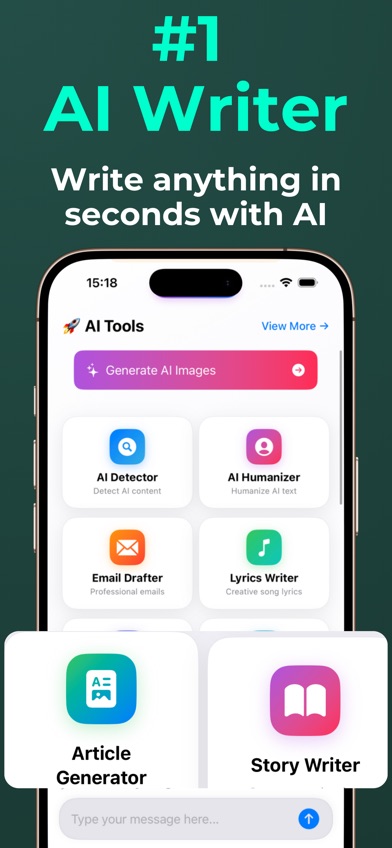
ACI: AI Writer & AI Chat is an iPhone and iPad app that puts an AI detector, humanizer and rewriter beside chat and drafting tools. Its strongest use is checking a passage, reviewing the estimated result and revising the same text without moving among several apps.
The detector analyzes text for likely AI patterns and can point to sentence-level signals. Detection remains an estimate. ACI also has writing, summarizing, image generation and voice input, but the detector plus revision loop is the more relevant reason to download it.
The US App Store showed 4.78 stars from 23 ratings in October 2026. That is a high score from a small pool, so it says less about long-term use than QuillBot's 3,061 ratings. The app was updated July 2, 2026, requires iOS 17 or later and lists one supported language.
Annual billing is $29.99. Weekly billing is $3.99, which becomes $207.48 across 52 weeks. The free download does not state a confirmed detector allowance. Android is not available in the verified listing.
- Detector, humanizer and rewriter in one app
- Low $29.99 annual price
- Only 23 App Store ratings
- Requires iOS 17 and has no verified Android app
- Price
- Free download; $3.99 weekly or $29.99 yearly, checked October 2026.
- Platforms
- iPhone and iPad with iOS 17 or later.
Pick ACI if you want to detect and revise text inside one affordable iPhone app.
ZeroGPT
ZeroGPT is a browser-based ChatGPT detector built for quick pasted-text checks. Its reported free limit is 15,000 characters per scan, which is enough for a substantial article and larger than the short-document limits imposed by several rivals.
That generous input box is ZeroGPT's case for inclusion. You do not need a team dashboard, API project or writing keyboard to check one document. Messaging-bot integration is also reported, though exact availability depends on the current service.
The paid plan was reported at $9.99 per month. Staying subscribed for a full year would cost $119.88; weekly, annual and lifetime prices were not confirmed. Reports conflict on whether free use is unlimited beyond the per-check character cap, so frequent users should check the listing before relying on it.
ZeroGPT sits below ACI because no current native iPhone, iPad or Android app was verified. It also has less documented workflow detail than GPTZero. Choose it for a quick, large browser check, then read the marked text yourself before drawing conclusions.
- Reported 15,000-character free scans
- Simple browser access
- Exact ongoing free allowance is unknown
- No verified native mobile listing
- Price
- Free access reported; $9.99 monthly, checked October 2026.
- Platforms
- Web; messaging integrations are reported.
Pick ZeroGPT if you want a large one-off web scan and do not need classroom or team tools.
Grammarly AI Detector
4.7 on the App Store (226,957 ratings)
Grammarly AI Detector is part of Grammarly's document editor and writing system. It makes the most sense when you already use Grammarly for grammar, tone and rewriting, since detection can sit beside the editing work you were doing anyway.
The iPhone and iPad app had 4.66 stars from 226,957 App Store ratings and was updated October 22, 2026. That is the largest verified rating pool here by a very wide margin. The app requires iOS 17.4 or later and supports typing in six languages.
Detector access and free word limits were not confirmed. The App Store listed a mobile-only annual purchase at $83.99, plus broader plans reaching $29.99 monthly or $139.99 yearly. Paying $359.88 across 12 monthly renewals is a grim way to avoid choosing the annual button.
Grammarly ranks last for this specific search because AI detection is one component of a much larger subscription, and the free detector allowance is unclear. It can still be the sensible choice for a current subscriber who wants fewer accounts.
- Detection inside a full writing editor
- Large verified App Store rating history
- Free detector limit is unknown
- Costs more than dedicated personal options
- Price
- Mobile-only annual plan $83.99; other plans up to $29.99 monthly or $139.99 yearly, checked October 2026.
- Platforms
- Web, desktop, iPhone and iPad; the iOS app requires iOS 17.4 or later.
Pick Grammarly if you already pay for its writing tools and want detection in the same document editor.
QuillBot vs GPTZero for AI detection
QuillBot and GPTZero both give more detail than a lone AI percentage, but they fit different routines. QuillBot is easier for an individual downloading an iPhone app; GPTZero has the better setup for teachers checking many assignments.
| Point | QuillBot AI Detector | Rival |
|---|---|---|
| Free use | QuillBot allows up to 1,200 words per scan. | GPTZero reports 10,000 words per month. |
| Result detail | QuillBot checks sentences and the full document. | GPTZero marks passages and has Deep Scan. |
| Mobile access | QuillBot has a verified iPhone and iPad app. | GPTZero's native mobile status is unverified. |
| Integrations | QuillBot centers on writing and keyboard tools. | GPTZero connects with Docs, Word and classroom systems. |
| Annual price | QuillBot costs $99.99 per year. | GPTZero's reported annual equivalent is about $156 to $180. |
QuillBot wins for personal use, especially on an iPhone. Its annual plan is cheaper, and the detector sits beside grammar and revision tools.
GPTZero wins when document volume and education integrations take priority. A teacher with a stack of assignments will probably get more from its monthly word pool and classroom connections.
What to check before downloading an AI detector
False positives and score detail
AI detectors can flag human writing, especially formal, technical or heavily edited prose. Look for sentence-level or passage-level marks that let you inspect the basis for a result. A single percentage gives you very little to audit. For school or employment decisions, compare more than one scan and review the writing history.
Free limits and annual cost
Check whether the limit applies per scan, per day or per month. A 1,200-word allowance is fine for essays but awkward for long reports. Compare a full year before accepting a weekly trial: ACI costs $29.99 annually, while its $3.99 weekly plan adds up to $207.48 over 52 weeks.
Privacy and unpublished work
Most web detectors process text on remote servers. Read the current privacy terms for retention, training use and deletion before uploading client drafts, medical details, contracts or an unpublished manuscript. If the policy is vague, use a short non-sensitive excerpt or choose a provider whose handling rules you can verify.
Native app or browser tool
A native AI detector app is useful when you check text on a phone and want keyboard or revision tools nearby. Browser services tend to have better team, API and classroom connections. Confirm the official store listing before downloading; similarly named detector apps are common, and a familiar logo is not verification.
Frequently asked questions
What is the best AI detector app in 2026?
QuillBot is the best AI detector app for most people because it has sentence-level results, 1,200-word free scans and a verified iPhone app.
What is the best free AI detector for students?
Scribbr is the best free option for short student papers because it allows unlimited 1,200-word checks without an account.
Which AI detector is best for teachers?
GPTZero is the best fit for teachers because it has a 10,000-word monthly free allowance and integrations with document and classroom tools.
Are AI detectors accurate?
AI detectors estimate whether text matches machine-written patterns, and their results can vary across tools. A score cannot prove who wrote a document.
Can AI detectors falsely flag human writing?
Yes, human writing can receive a high AI score. Formal, technical and edited writing deserves close manual review after any flag.
Can paraphrasing bypass a ChatGPT detector?
Paraphrasing and mixed human-AI editing can change detection results, but performance is inconsistent. Repeated rewriting does not guarantee any particular score.
Do AI detector apps store uploaded text?
Storage and training policies differ by provider. Read the current privacy and retention terms before uploading confidential or unpublished work.
The best AI detector for most people
QuillBot is our first recommendation for its useful free limit, sentence-level analysis and verified iPhone app. Teachers should choose GPTZero for its larger monthly pool and classroom connections; students who want a free check without an account should use Scribbr. Every result is an estimate, so read the flagged passages before accusing a person or rejecting their work.
ACI is the best pick for detecting and revising on iPhone
ACI: AI Writer & AI Chat is worth trying if you want an AI detector, humanizer and rewriter inside the same iPhone or iPad app. That check-and-revise setup is its strongest point: you can inspect sentence-level signals and edit the passage without switching services. The $29.99 annual plan is far cheaper than paying $3.99 every week. ACI suits iOS users who value an all-in-one writing app, though its detection result remains an estimate and its 23 App Store ratings form a small sample.